AI note generator for PDFs and lecture slides
Study chapter by chapter with notes grounded in your file. Check the source, ask a question, and practise what you have just read.
From a PDF paragraph to notes you can use
A hand-written teaching example, not a live AI result. The original one-page PDF is available below.
The device delivers 150 J of useful energy from 200 J of input energy.
Download the one-page sample PDF
The study note
Efficiency compares useful output energy with total input energy. Divide output by input, then multiply by 100. Here, 150 / 200 × 100 = 75%.
Use 200 J in the denominator: that is all the energy supplied, not just the useful part.
Try a different question
A second device receives 250 J and delivers 200 J of useful energy. What is its efficiency?
Check the answer
80%: 200 / 250 × 100. The useful output is the numerator; total input is the denominator.
Use the same approach with your own material
- Textbook PDFs: work through definitions and worked examples chapter by chapter, with source references to check.
- Lecture slides: turn compressed bullet points into study notes, then ask about the parts you cannot explain.
- Articles and handouts: keep the key ideas beside their source and check your understanding with questions.
From a PDF you haven't read to notes you can study from
Most people run a file through an AI note generator once, get a wall of summary text back, and never open it again. Tali works the other way round. It goes through your material in order and leaves you a run of short, titled notes — one idea each — and then makes you use them instead of just filing them.
1. Upload the file you've been avoiding
The 300-page curriculum PDF, the twelve lecture decks, the DOCX handout, the photo you took of the whiteboard. Up to 30MB a file. You don't have to mark up the important pages first — deciding what matters is the work you're trying to hand off.
2. Get a run of short notes, not one summary
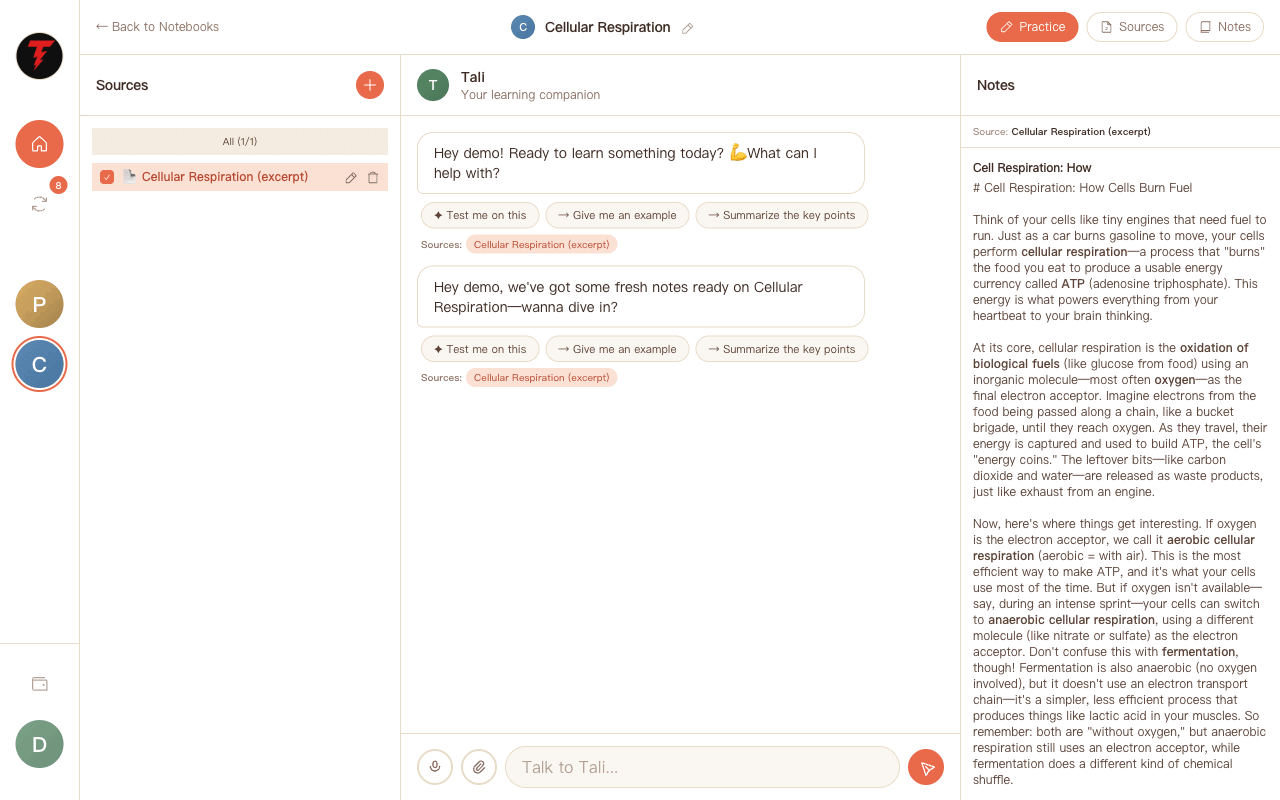
Tali reads the material a passage at a time and writes a short note with its own title for each one, in the order the book makes its argument. A fixed-income chapter comes back as a list you can scan — 'Bond duration', 'Convexity', 'Immunisation' — so you can open the one idea you're stuck on instead of scrolling a single blob. And the notes can come out in your language even when the source isn't.
3. Then argue with the notes
A note you never reopen was a waste of an upload. Every note has a chat attached that already knows what's in it: ask why, ask for a worked example, ask it to test you — by typing or out loud. Then say the idea back in your own words and let Tali tell you where you were vague.
Why this beats pasting a chapter into a chatbot
A list of notes, not one compressed page
A summary throws material away; notes keep the thread. Tali follows your material in order and leaves you a sequence of short titled notes, each covering one thing. When a derivation stops making sense on Thursday, you open the note that covers it — you don't re-skim a 4,000-word answer hunting for the paragraph you need.
The notes answer questions
Open a note and Tali is already inside it, with the content of that note as context. 'Explain this line.' 'What's the difference between these two terms?' 'Give me an example that isn't the one in the book.' No copy-pasting the chapter back in every time you have a follow-up.
You have to explain it back
Following along and knowing it are two different things. So Tali asks you to say a knowledge point back in your own words, and points at the places you hand-waved. It's the least comfortable part of the product and the reason it works.
The practice comes off your own pages
From the same notes, Tali generates multiple choice, single choice, fill-in-the-blank, true/false and open-ended questions — and marks the open-ended ones, telling you what your answer missed. The questions come from your chapter, not from a generic bank that half-overlaps your syllabus.
Who actually ends up here
The certification you keep restarting
CFA, PMP, AWS, CPA. You've been through the official curriculum twice and still couldn't explain the topics out loud to a colleague. Turn each reading into notes, then let Tali keep asking about them until the explanation comes easily.
The course where the slides are the only material
Twelve lecture decks, no textbook, an exam in three weeks. Upload the decks, get notes you can go through topic by topic, and use the chat to fill in what the slides skipped — including the questions you wouldn't want to ask in a seminar.
Material in a language that isn't your own
The textbook, the paper or the manual is in English, but you'd rather think it through in Spanish or Chinese. Tali writes the notes in the language you're most comfortable in while keeping the original terminology, so you learn the concept and the word for it at the same time.
Questions people ask before they upload anything
Verify your email to receive 5 free credits, with no card required. One credit turns one source into notes, and every practice question written from it is included, so the free balance comfortably covers your first few ordinary materials — notes, practice and review included. After that you top up when you need to. No subscription required; you pay only for what you generate (there is a $20/month plan for 60 credits if you prefer).
PDF, DOCX, PPTX, Markdown, plain text, and photos or screenshots of pages (PNG, JPG, WEBP, HEIC). Up to 30MB per file. If your book is one enormous scan, upload it a chapter at a time — the notes come back better organised, and you'll be studying chapter by chapter anyway.
The time depends on the length and format of the file. Large files and exam papers can take several minutes or longer. You may see some notes while the rest are being prepared. You can leave the page and come back later; generation continues in the background.
They're written from the file you uploaded rather than from whatever a model remembers about the subject, so they stay on your syllabus and use your material's terminology. But this is still AI: it can misread a table or flatten a nuance. The note sits beside its source for a reason — when something looks off, check it, and ask the chat why it said that.
Your material is used to generate your own notes and practice, and for nothing else. It isn't shared and it isn't sold. Delete a material whenever you like and the notes and questions generated from it are deleted with it.
Yes — that's a large part of why people use Tali. It writes notes in English, Chinese, Spanish, Japanese, Korean, French, German, Portuguese, Russian or Italian, whatever language the material itself is in.